TypeSafe AI · Jev · CMS support desk demo
How Jev makes the call
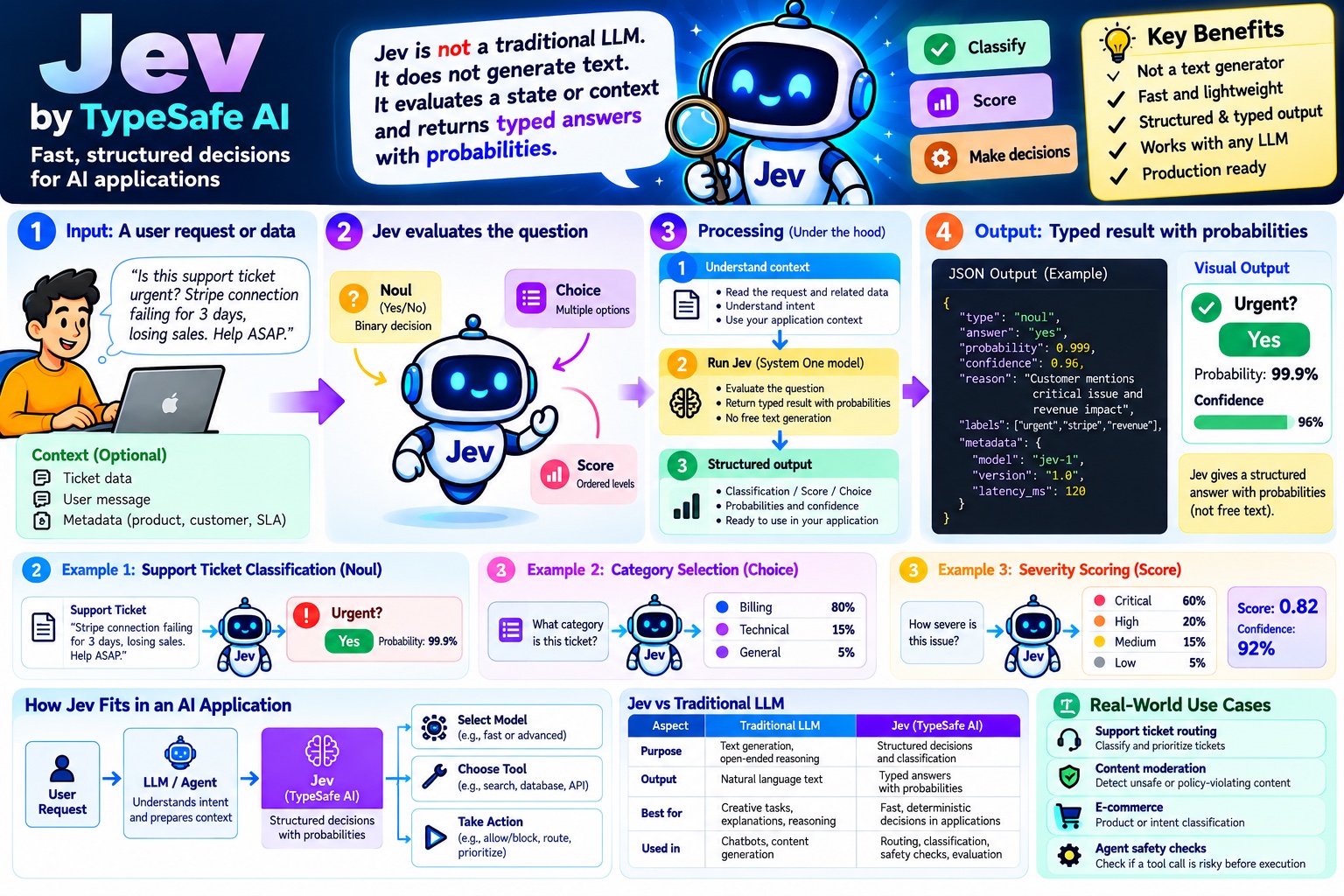
Jev doesn't write text. You send it some state and a set of typed questions, and it sends back probabilities. Your own code compares those numbers to thresholds and picks the action. Pick a sample on the left and follow the three steps.
- InputA support ticket, or a tool call your AI agent wants to run
- JevAnswers typed questions with probabilities. No generated text.
- Your codeChecks each answer against thresholds you control
- ActionRoute the ticket, or allow, confirm or block the tool call
This page uses the repo's offline mock (src/mock.js): keyword rules that return answers in Jev's exact response shape. Real Jev reads meaning, so judge accuracy with a live key and npm run demo. The decision rules and thresholds are the real ones from src/triage.js, src/gate.js and src/questions.js.
What your code sends to Jev
One POST to api.typesafe.ai/v1/systemone with the state and every question.
What Jev sends back
One typed answer per question. The black tick on a bar is the threshold your code checks.
What your code decides
Rules run top to bottom. The first one that fires wins.